Get started
Home & the T2 assistant
Home is your launchpad, and T2 is the AI assistant available on every page. Together they let you get things done by asking, then reviewing what T2 proposes before anything happens.
Your Home dashboard
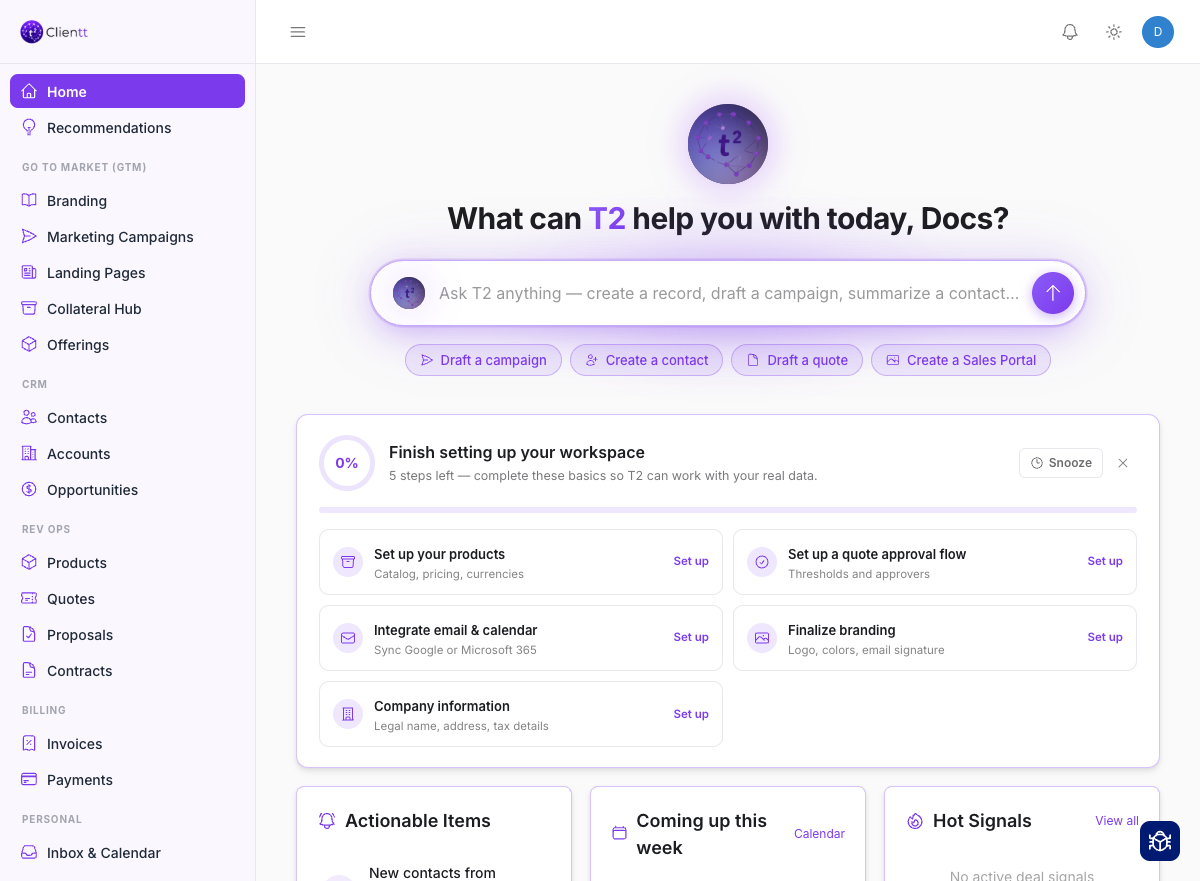
Home is an agent-first dashboard built around what needs your attention right now. At the top is a T2 prompt — "What can T2 help you with today?" — so you can start any task by typing what you want.
- An Actionable Items card gathers approvals waiting on you, overdue tasks, pending AI enhancements, and invoices that need attention.
- Strips for your upcoming calendar events and important emails keep your day in view.
- Quick-start buttons get you into common tasks in one click.
Recommendations
Recommendations sits next to Home and collects the suggestions Clientt has for you — the follow-up worth making, the record worth completing, the campaign worth a second look. Act on one, talk it through with the assistant, or dismiss it; anything you've already handled moves into History.
Meet T2
T2 is a conversational assistant that lives in the footer of every page. Instead of clicking through menus, you can just ask — and T2 does the work.
- Create and enrich records, including contacts, accounts, and campaigns.
- Build landing pages, forms, and emails.
- Search the web and navigate the app for you.
- Edit fields on a record, or run a bulk action across many records.
How T2 works (with your confirmation)
T2 never acts behind your back. Before it saves or sends anything, it shows you a preview card and waits for you to approve it — a human always stays in the loop.
Reviewing AI enhancements
When T2 enriches a contact or account with details from the web, it doesn't overwrite your records automatically. The proposed changes collect in one place so you can review them, then apply the ones you want or reject the rest.