Marketing
Offerings
Offerings are one catalog of everything you sell. Describe each thing once — what it is, what it costs, how it's written about — and reuse it across your landing pages and campaign emails.
What you can do
- Keep products, services, bundles, features, and add-ons in a single catalog.
- Build a bundle by nesting other offerings inside it, and mark each one required, included, or an optional add-on.
- Set prices, publish when you're ready, and keep work-in-progress in Drafts.
- Drop an offering straight into a landing page or a campaign email.
The catalog
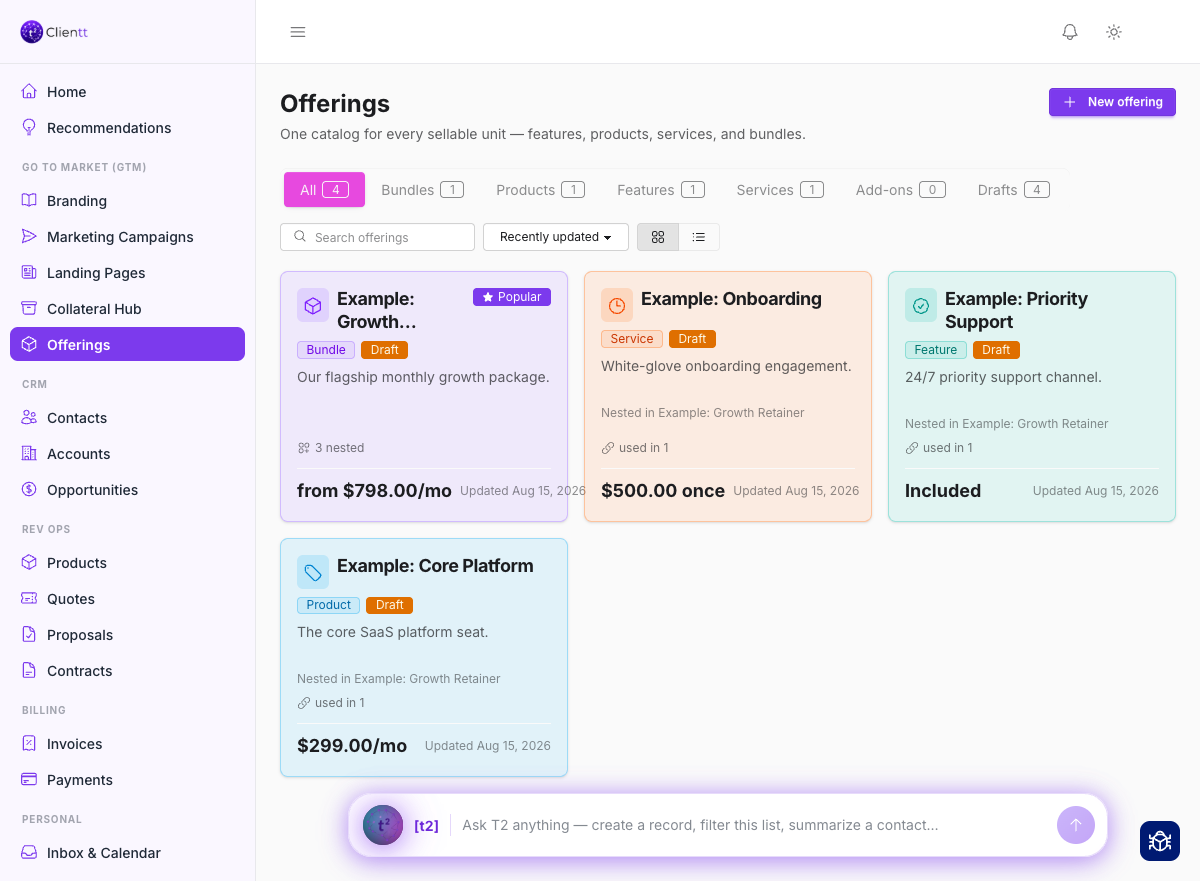
Open Offerings from the left sidebar. Tabs across the top split the catalog by kind — Products, Services, Bundles, Features, Add-ons — with Drafts holding anything you haven't published. Search by name, switch between a grid and a list, and sort by what changed most recently.
Building an offering
Open any offering to work on it. A bundle is built by adding other offerings inside it, so you describe a thing once and reuse it wherever it belongs.
- Choose Add inside and search for the offerings this one should contain.
- Mark each as Required, Included, or an Optional add-on so the shape of the deal is clear.
- Reorder with move up and down, or lift something back out to the top level.
- Add a price, then publish.
Need a near-copy — same shape, different terms? Duplicate as variant makes one, and when you do it from inside a bundle the new variant is swapped in for you.
Writing the copy
Each offering carries its own marketing copy. Choose Generate copy and the assistant drafts it from what the offering already is — its name, what's inside it, and its price — so you're editing a draft rather than starting from an empty box.
Using offerings in your content
An offering isn't just a record. From a landing page or a campaign email, insert an offering and it renders with its own copy and price — so when the offering changes, you're updating one place instead of hunting through everything you've published.